
HTTP
The HTTP server is somewhat more complex than other servers due to its wide range of configuration options.
Attention
The current HTTP server implementation does not support custom error codes after successful authentication. The default returned code is 418.
Section [HTTP]
Added in version 1.0.0.dev1.
- HTTP.Server: list
Each entry maps to an instance of
http.HTTPServerConfigDefines a list of HTTP servers. For details on configuring section lists, see the general configuration guide on Array Tables for TOML.
- Server.Port: int
Maps to
http.HTTPServerConfig.http_portSpecifies the port on which the HTTP server instance listens. This option is required and must be defined within each individual
[[HTTP.Server]]section.
The attributes described below may also be specified in the global
[HTTP]section, where they will serve as default values for all individual server entries — unless explicitly overridden.- Server.ServerType: str = "Microsoft-IIS/10.0"
Maps to
http.HTTPServerConfig.http_server_type. May also be set in[HTTP]Specifies the server name returned in the Server header.
Changed in version 1.0.0.dev7: This setting is now a formatted-string, which means, it supports templating as specified by Jinja2. For instance:
[HTTP]
# ...
ServerType = "Foobar-{{ random(10) }}"
This definition will result in ten random characters appended to
Foobar-for each session. More information about formatted-strings are coming up in future releases.
- Server.ExtraHeaders: List[str]
Maps to
http.HTTPServerConfig.http_extra_headers. May also be set in[HTTP]A list of headers to include in all server responses. Each entry must be a fully qualified HTTP header line without CRLF at the end.
- Server.TemplatesPath: List[str]
Maps to
http.HTTPServerConfig.http_templates. May also be set in[HTTP]A list of directories containing templates for custom web pages. You can override the default error page template
error_page.htmlwith your own. The default template mimics an IIS error page.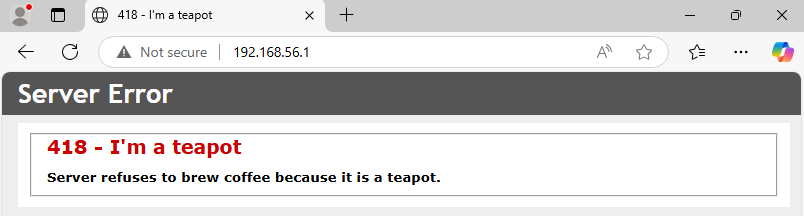
Page style matching Microsoft IIS defaults.
- Server.Methods: List[str] = ["GET", "POST", "PUT", "DELETE"]
Maps to
http.HTTPServerConfig.http_methods. May also be set in[HTTP]Defines which HTTP methods are supported. Note:
OPTIONS,HEADandPROPFINDare reserved for internal use.Changed in version 1.0.0.dev2: HTTP method
HEADwill be excluded too.
- Server.AuthSchemes: List[str] = ["Basic", "Negotiate", "NTLM", "Bearer"]
Maps to
http.HTTPServerConfig.http_auth_schemes. May also be set in[HTTP]A list of supported authentication schemes. These are returned via the WWW-Authenticate header.
- Server.WebDAV: bool = true
Maps to
http.HTTPServerConfig.http_webdav_enabled. May also be set in[HTTP]Enables WebDAV protocol support. If disabled, requests using
PROPFINDwill result in an error page.
- Server.WPAD: bool = true
Maps to
http.HTTPServerConfig.http_wpad_enabled. May also be set in[HTTP]Enables hosting of a WPAD configuration file. You can control whether this file requires authentication using
HTTP.Server.WPADAuthRequired. The actual WPAD script content is controlled byProxy.Script.
- Server.WPADAuthRequired: bool = true
Maps to
http.HTTPServerConfig.http_wpad_auth. May also be set in[HTTP]Determines whether access to the WPAD script requires authentication.
- Server.ExtendedSessionSecurity: bool = true
Removed in version 1.0.0.dev19: Deprecated: renamed to
DisableExtendedSessionSecurity
- Server.DisableExtendedSessionSecurity: bool = false
Linked to
http.HTTPServerConfig.ntlm_disable_essChanged in version 1.0.0.dev5: Internal mapping changed from
http_esstontlm_essChanged in version 1.0.0.dev19: Renamed from
ExtendedSessionSecurityto explicitDisableExtendedSessionSecurityEnables Extended Session Security (ESS) for NTLM authentication. With ESS, NetNTLMv1-ESS/NetNTLMv2 hashes are captured instead of raw NTLM hashes. Resolution precedence:
HTTP.Server.DisableExtendedSessionSecurity(per-instance)HTTP.DisableExtendedSessionSecurity(global HTTP fallback)NTLM.DisableExtendedSessionSecurity(final fallback)
- Server.Challenge: str = NTLM.Challenge
Maps to
http.HTTPServerConfig.ntlm_challenge. May also be set in[HTTP]Changed in version 1.0.0.dev5: Internal mapping changed frmo
http_challengetontlm_challengeSets the NTLM challenge value used during authentication. Resolution order:
HTTP.Challenge
- Server.FQDN: str = "DEMENTOR"
Linked to
http.HTTPServerConfig.http_fqdn. May also be set in[HTTP]or[Globals]Sets the Fully Qualified Domain Name (FQDN) returned by the server. The hostname portion is used in NTLM responses. The domain portion is optional.
Changed in version 1.0.0.dev7: This setting is now a formatted-string,
- Server.TLS: bool = false
Linked to
http.HTTPServerConfig.http_use_ssl. Can also be set in[HTTP]Enables SSL/TLS support using a custom certificate.
Added in version 1.0.0.dev3.
- Server.Cert: str
Linked to
http.HTTPServerConfig.http_cert. Can also be set in[HTTP]or[Globals]Specifies the path to the certificate used when TLS is enabled.
Added in version 1.0.0.dev3.
- Server.Key: str
Linked to
http.HTTPServerConfig.http_cert_key. Can also be set in[HTTP]or[Globals]Specifies the private key file corresponding to the certificate used for TLS.
Added in version 1.0.0.dev3.
Default Configuration
 1[HTTP]
 2# Global settings for all HTTP servers
 3ServerType = "Microsoft-IIS/10.0"
 4FQDN = "DEMENTOR"
 5ExtraHeaders = [
 6    "X-Powered-By: Dementor",
 7]
 8WebDAV = true
 9WPAD = true
10WPADAuthRequired = true
11AuthSchemes = [ "Basic", "Negotiate", "NTLM" ]
12HTTPMethods = [ "GET", "POST", "PUT", "DELETE" ]
13
14[[HTTP.Server]]
15Port = 80