FileManagement Service#
The tool mmsclient.py provides an interactive shell for exploring
and interacting with a remote MMS peer.
To start a new MMS client session, run:
mmsclient.py [options] host [command [args...]]
You will be dropped into an interactive shell similar to this:
mms> help
Documented commands (type help <topic>):
========================================
cd    del    get    help   id    ldir
ls    quit   rdir   rename ...

mms>
Tip
You can also invoke any of the documented commands below directly by specifying them after the host argument. For instance:
mmsclient.py <host> ls
Tip
To view the help message for each implemented command, use --help
together with the command:
mmsclient.py --help ls
Usage: ls [-h] [-l] [-a] [directory]

positional arguments:
directory   Remote directory to list (defaults to current remote directory)

optional arguments:
-h, --help  show this help message and exit
-l          Print output as a list (table) instead of filenames only
-a, --all   List all files, including ones in subdirectories
Listing Files (ls)#
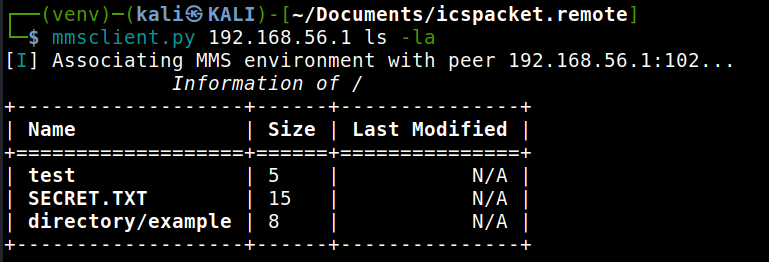
Use the ls command to list files in the current or a specified
directory on the remote MMS peer.
mms> ls [-l] [directory]
test    SECRET.TXT    directory
By default, ls lists the contents of the current working directory.
Passing a directory name as an argument lists that directory instead.
Note
The MMS peer’s directory model may differ from a traditional POSIX filesystem. File names are constrained by the MMS File Service specifications.
Changing Directories (cd)#
The cd command updates the current working directory context.
mms> cd LOGS
mms> ls
SYS.LOG       ERROR.LOG     SESSION.DAT
Local vs Remote Directory Listings#
ldirshows the local filesystem working dir (your machine).rdirshows the remote peer filesystem working dir.
This distinction is useful when comparing files before uploading or downloading.
Tip
Use ldir before a get to verify the local destination path.
Downloading Files (get)#
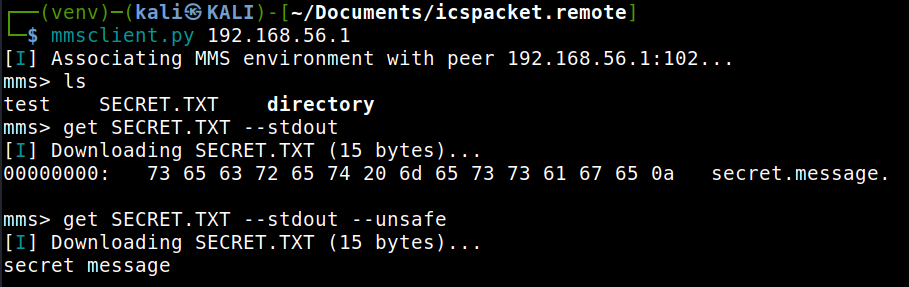
The get command retrieves a file from the remote MMS peer.
Arguments:
remote_nameThe file name on the remote MMS peer (required).local_nameThe local destination file name (optional).--stdoutPrint the file content directly to standard output instead of saving. (hexdump)--unsafePrint out the file content directly.
Uploading Files (put)#
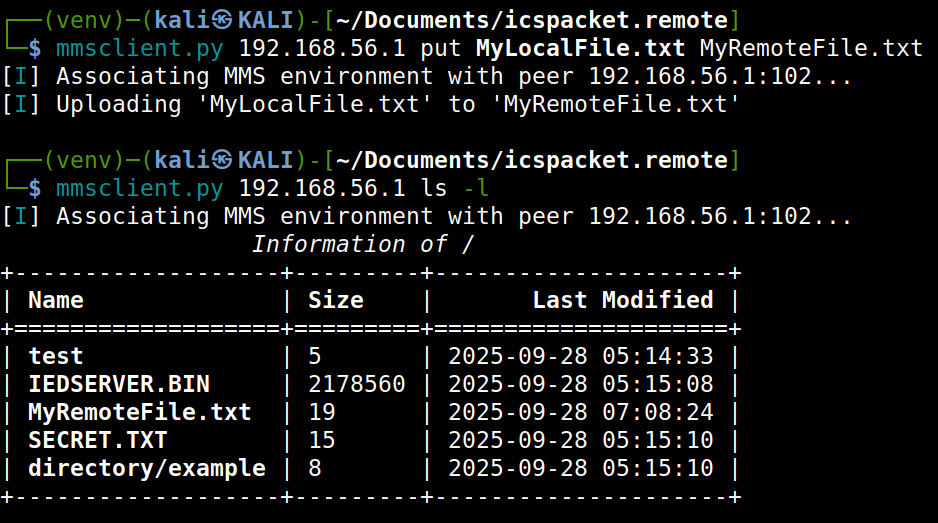
The put command transfers a local file to the remote MMS peer.
Arguments:
local_nameThe local file name to transfer.remote_nameThe file name on the remote MMS peer (optional).
Deleting Files (del)#
The del command removes a file from the remote MMS peer.
mms> del TEMP.DAT
mms> ls
FILE_A.TXT    FILE_B.BIN