Variable Target Format#
A “variable” is an abstract element of the VMD that is capable of providing (when read) or accepting (when written), or both, a typed data value. A “type description” is an abstract description of the class of data that may be conveyed by a variable’s value. A variable’s type description determines its abstract syntax, its range of possible values, and its representation while being communicated using MMS.
—ISO 9506-1 14.1
Variables can be addressed using a target string specification. The CLI accepts one of the following formats:
<domain>/<variable>Explicitly specifies both the domain and the variable name.<variable>A shorthand notation where a global domain is provided via--domain.vmd:<variable>Custom VMD defined named variable.aa:<variable>Custom AA (application association) defined named variable.or a path to a file containing lines with one of the formats mentioned above
Variables may be given as inline arguments or read from a file. If the provided string is a path to a file, each non-empty line in that file is treated as one variable target.
Tip
In all ceses "." in variable names will be replaced with "$" to comply with the
specification. For example:
mms_utility.py var --read DOMAIN_NAME/sensor.temperature <host>
This will internally translate to the MMS variable name
DOMAIN_NAME/sensor$temperature.
Warning
Only domain-specific variables are supported yet!
VariableAccess Service (rwq)#
The example tool provides three primary variable access services:
Query (
--query): Retrieve metadata about a variable (type, address, attributes).Read (
--read): Retrieve the current value(s) of one or more variables.Write (
--write): Modify the value of a variable.
Querying Variables#
Use the --query flag to inspect the attributes of a variable.
This is especially useful to determine the variable’s data type before writing to it.
mms_utility.py var --query <domain>/<valve_state> <host>
The response typically includes information such as:
Variable type (e.g.,
BOOLEAN)Address specification (if available)
Access rights (if present)
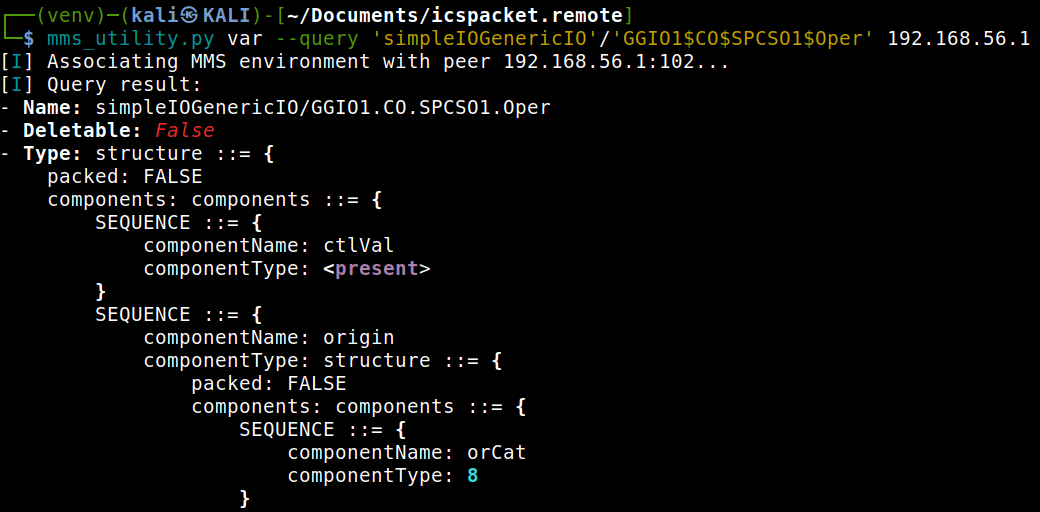
Even complex types will be shown.#
Reading Variables#
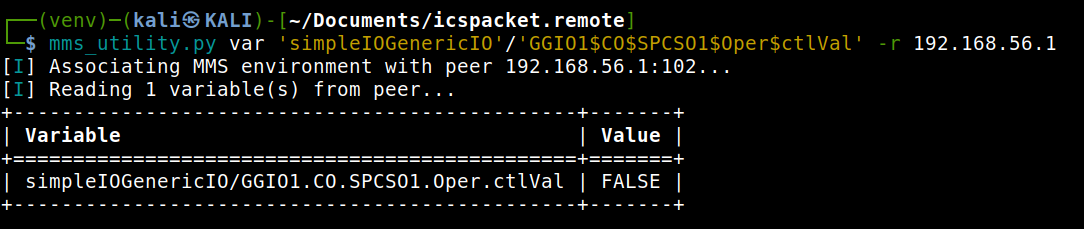
To read variables from a remote MMS peer, use the --read flag.
mms_utility.py var --read <domain>/<variable> <host>
Multiple variables may be specified:
mms_utility.py var --read domain1/sensor1 domain1/sensor2 <host>
Or, if a global domain is defined:
mms_utility.py var --domain domain1 --read sensor1 sensor2 <host>
The result is a list of AccessResult values for each variable.
Writing Variables#
Writing requires both the --write flag and a --value specification.
The --value follows the format <type>:<value>.
Supported types are:
str→ VisibleStringint→ Integerfloat→ FloatingPointuint→ Unsignedbool→ BOOLEANbits→ BIT STRINGoid→ ObjectIdentifiermms-str→ MMSStringbytes→ OCTET STRING
Example: writing a string value
mms_utility.py var --write --value str:"Pump started" plant_data/status <host>
Example: writing an integer value
mms_utility.py var --write --value int:42 domainA/counter <host>
Example: writing a boolean
mms_utility.py var --write --value bool:true domainA/valve_state <host>
Note
For binary/octet data, pass hex-encoded strings or a file path.
Warning
structured values (arrays, structures) are not supported yet